How to give a good presentation (with the help of LLMs)
I recently did my presentation at the class and at the hackathon.
One recurring frustration I’ve had for a while is that my slides don’t really reflect my own taste.
I always ended up making mediocre slides and delivering presentations based mostly on scripts written by LLM. I wasn’t satisfied with the results at all.
You still need to hold the core message
I don’t understand why LLMs are so bad at making slides unlike how they explain in chat.
Their content often feels overly compressed, with too much information in a single slide, and doesn’t have a clear storyline that audience can follow.
“You still need to hold the core.” What I want to say here is that it’s a little bit different from whether you know the content. It’s more like you should know how to step by step walk through your thinking for easy understanding for the audience.
Case 1: Kind of a failure :(
The first approach I did for the brief journal review-style presentation felt kind of a failure. I did discussed a lot about the paper in the chat session, and then ask them to make a slide with the context of the audience level and what I want to focus mainly.
But it didn’t turn out with the content aligned with my intention. And I tried to fix each nits, but it didn’t work out well in the sense that it almost spent the same time compared to what I would spend if I edit them manually.
And I want to try to give my taste by making a reference slide on my own in the Keynote. But actually, I think the model failed to interpret or grasp my taste, and it just broke it when it edited overall the page.
What it actually ended up is the slide below.

Plus the script was messy. I didn’t quite confined it before working on the slides. The workflow was a mixture of making slides and writing scripts, and I ended up failing in both.
sad
Case 2: With the adequate level of satisfaction
I just gave another presentation at a hackathon, and I’ve done most of the work.
What really helped with making these slides or preparing the presentation was the conversation that I had with one of the hosts of the hackathon in the morning of the day.
Outline the script well
When I tell someone about what I did, first I need to tell them the motivation which includes the situation and observed problem.
Since we only had the information from the Hackathon website, which is insufficient. It really helped to understand the real problem of the company and connect it to our solution or what we built.
I first gave the context of our code and asked model to write the first draft of the presentation.
I told it this is a hackathon presentation and the overall structure, first motivation and then our solution including our code.
Since LLM doesn’t really good at handling all the work at once. I kept the paragraph that I liked to my separate note and then try to edit the remaining parts by part.
In this process, the conversation I had in the morning. The LLM at first couldn’t really set the motivation correctly. It lacked statistical support, and also it focused too much on the technical implementation which doesn’t really solve any problem. I tweaked its thinking path by giving more context from the conversation and also asked it to search the statistics which could objectively support our argue.
And after those steps, I finally got the script that I’m satisfied. Also, I manually edited some of the words simultaneously while my LLM does work for me. For example, in the first draft the when referring the host company, it was written too generally. It said like “the organizer of the hackathon” rather than calling the company name directly.
Final script
1. AISUM Foundation & The Core Hesitation
“AISUM has demonstrated the power of visual AI: analyzing creator images and videos, detecting the products they wear, and automatically linking customers to items on Amazon.”
2. Market Contrast & Data-Backed Evidence
“However unlike Korea where consumers readily copy influencer lookbooks, the US market is driven by body diversity and individualism, relying on ‘people like me’ and peer validation: Nielsen reports that 88% of consumers trust recommendations from friends and family over any advertising, and Standard Insights finds that when recommendations conflict, 31% follow a friend while only 2% follow an influencer.”
3. Outfit Share: Multidimensional Motivations & Product Flow
“We built Outfit Share around this reality, driven by multidimensional social motivations.
On one side, it is practical peer curation: recommending a genuine look to a friend, suggesting styling advice, or coordinating matching twin and similar looks for an upcoming event.
But on the other side, it taps into pure viral entertainment: teasing your friends by putting an outrageous, eccentric, or meme outfit on them just to share a laugh.
In both cases, the call to action is the same: ‘You have to try this on.’
The recipient simply opens the web link, without downloading any app, and their webcam immediately applies the outfit through Decart’s real-time video virtual try-on. They see how the garment drapes and moves on their own body. Right from that try-on screen, a single click on ‘Find on Amazon’ matches the clothing’s visual attributes against active Amazon listings, providing immediate pricing, ratings, and a direct purchase link.”
4. Conclusion: Go-To-Market Hypothesis, MVP & Testing
“In conclusion, we established a localized Go-To-Market hypothesis tailored specifically for the US market: shifting from top-down influencer replication to peer-level, live camera validation and viral friend-to-friend links.
To test this hypothesis, we built and deployed this functional MVP, connecting live camera try-on directly with Amazon product matching in a single, frictionless browser session.
We are now rolling this out to test real-world user adoption: measuring link-sharing virality, live try-on completion rates, and downstream purchase conversion.
You can test the live deployment today at this site (outfit-share-897346171443.us-central1.run.app). Thank you, and we welcome your questions.”
Turn the script into slides
Then I started to work on making slides.
I first tried with Gemini 3.8 Flash, and it was really disappointing.
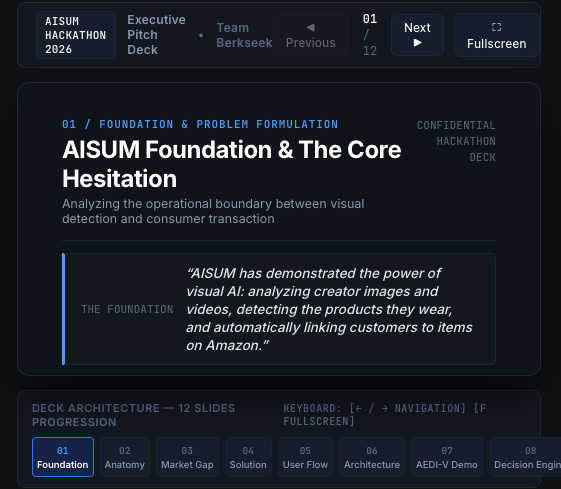
It’s very clear that Google didn’t use their slides database to train the Gemini, or just Flash model wasn’t enough big to making a presentation slides.
I tried to resolve the issues one by one through prompting Gemini. It still didn’t work. So I changed to use bigger model, which is Claude Opus 5.5.
I gave the entire script along with some presentation design principles which, ironically, I had learned from Gemini through all our back-and-forth.
Principle of a good presentation slides
### 3 Core Principles of Effective Slide Design

**1. One Slide = One Key Message + One Visual**

- Instead of stacking three text boxes side by side, make the key visual you want the audience to see (e.g., an actual try-on screen or a phone mockup) occupy **70% of the slide**.
- Keep the accompanying message to just **1–2 lines**.

**2. Use Screenshots and Arrows Instead of Text**

- Instead of describing the process in text:
`01 Create a link → 02 Virtual try-on via webcam → 03 Purchase on Amazon`
- Show the actual user journey through **three screenshots arranged horizontally**:
`[Screenshot of a link shared via KakaoTalk] → [Screenshot of the actual virtual try-on experience via webcam] → [Amazon product detail page]`
- Showing the actual experience this way is **10 times more effective** than explaining it with text.

**3. Let Numbers Speak for Themselves**

- For data-driven slides featuring metrics like **88% or 31%**, remove all explanatory text.
- Display the number alone in an **enormous font at the center of the slide**.
- Let the presenter explain the context verbally. This creates much stronger audience focus and impact.
Also, since our main page was animated, I recorded it five seconds and gave it to Claude. Then I asked it to keep the overall design to the subsequent slides also.
Use the attached video as the cover slide. Keep the overall design of the subsequent slides consistent with the cover, while prioritizing readability. Ensure that all text throughout the presentation is in English.On stage
And then it really worked well. And during the talk, I didn’t refer the prepared scripts, even though my grammar is not perfect.
It feels better to understand the content precisely and then just try to explain it. In that way, what I’m saying and the slides are more synced.
Anyway, really glad that I finally did my a certain level of satisfying presentation. And I hope to replicate this in a later time too :)